01
Load audio
Drop a track, or open a mic or mixer. Analysis stays on this machine. Nothing is uploaded.
Procedural music visuals
Make audio-reactive visuals for live sets in the browser.
On the desk
14 looks
Powered by WebGL
16 audio hooks
Bands, beats, and transients
96 scenes
Cue a full set
MIDI controls
Map any controller
Any display
Second screen or projector
How it works
Load a source. The picture follows the mix. You send the stage to any display.
Drop a track, or open a mic or mixer. Analysis stays on this machine. Nothing is uploaded.
Bands and beats drive the look. Mix it, save a cue, and play the set from the desk.
Fill this screen or a second display. The desk stays with you. The picture goes to the room.
Try it
Play our demo audio or select your own track. Pick from 3 basic looks, mess with the sliders, and see what happens! These are only 6 controls out of 70+ in the full app.
Press Play demo to hear a loop, or drop a file.
The desk
Every control below is on the live desk.
The kick, the hats, and the vocal each move a different part of the picture. Sixteen audio hooks lock motion to the mix, from sub rumble to air, and from loudness to tempo.
Fourteen starting points, from tight geometry to open fields. Every look is endlessly customizable and mixable.
Save the night as cues and fire them mid-set. Stack up to 96 scenes across 24 sets.
Map a MIDI control to any parameter. An input can fire a scene. Maps stay on this machine.
Send the picture to any display. Keep the desk on one screen and fill the house with the other.
Drop clips, stills, an HTML page, or a screen share into the picture. Crop, grade, and fold them until they belong to the set.
The console
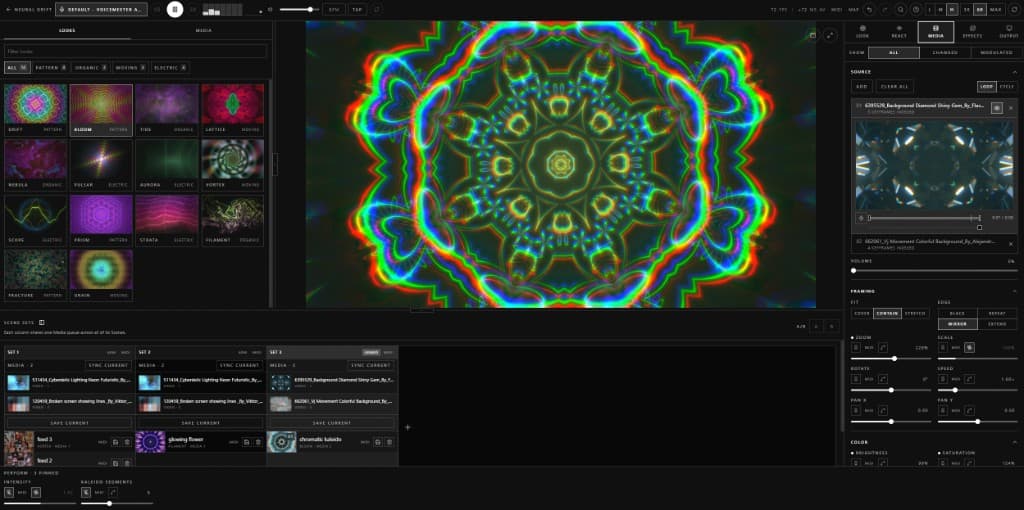
Browse on one side. Drive the picture on the other. Search any control. The night stays on this machine.
Built for
Play the picture with the music. Switch looks and cues without a timeline.
Send the house a stable picture on mixed hardware.
Leave it running in a browser on that machine.
Plans
The public beta is free and limited. Paid desks add looks, custom media, video export, output size, and extra sources.
Free
Demo looks and the supplied media.
Studio
All looks, your files, and video export.
Recommended
Stage
Live rooms: HTML, screen share, and 100 GB of storage.
Lab
2 TB of storage, early features, and priority support.
Questions
No. File, mic, and line-in analysis run in the browser. We do not upload tracks, stems, or microphone audio.
A current desktop browser with WebGL2. Use a GPU that can decode media and run live effects.
Yes. Map MIDI controls to parameters, or inputs to scenes and sets.
Open a detached output window and move it onto the house display. Or fullscreen the stage on this screen.
They stay in this browser. You can also upload scenes, looks, and media to your account. That copy is private. Export a project file when you need a local copy.
Clips and stills from your files, HTML pages, and a screen share. Free accounts use the supplied media only. HTML pages and screen share need a paid plan that includes those sources.
Studio, Stage, and Lab can record the Stage from Output. They can also write a 24, 30, or 60 fps file from a loaded track. Stop a recording, or wait for a file write, to save an MP4 file on this machine. The file stays local.
The public beta is free, but it is limited. A free account gets 3 demo looks and the supplied media. HTML pages and screen share are not included. Paid plans start at $6 / month.
Invite-only beta
The live console is invite-only. Leave your email. We send an invite when we can.